The Four Johannas
by Ed Sawicki
I've been documenting my family tree for a few years. This involves, among other things, collecting photos of about 600 people. One particular branch of the family tree is interesting. It involves a younger cousin named Johanna who lives in New York. She named her daughter Johanna. Her grandmother was named Johanna. Her great-grandmother, who is also my great grandmother, was also named Johanna.
Recently, we spoke about a 1912 photo of her grandmother when she was a child. I mentioned that we have a 1968 photo of her (my cousin) when she was about the same age. I said that I would combine those photos so it would appear that both she and her grandmother were the same age and standing together. I used ChatGPT to merge the photos and improve the quality. My cousin loved the photo.
Then I noticed that we had a photo of her daughter at about the same young age. I used ChatGPT to add the third Johanna to the image. My cousin and I loved the result.
Then we spoke about our great grandmother also being a Johanna. She said it was too bad we didn't have a photo of her at a young age. We had a photo of her when she was 38 years old. I uploaded the photo to ChatGPT and asked it to make the woman appear as though she was 8 years old. My cousin and I were pleased with the result, so I added this fourth Johanna to the image.
Here's the image:
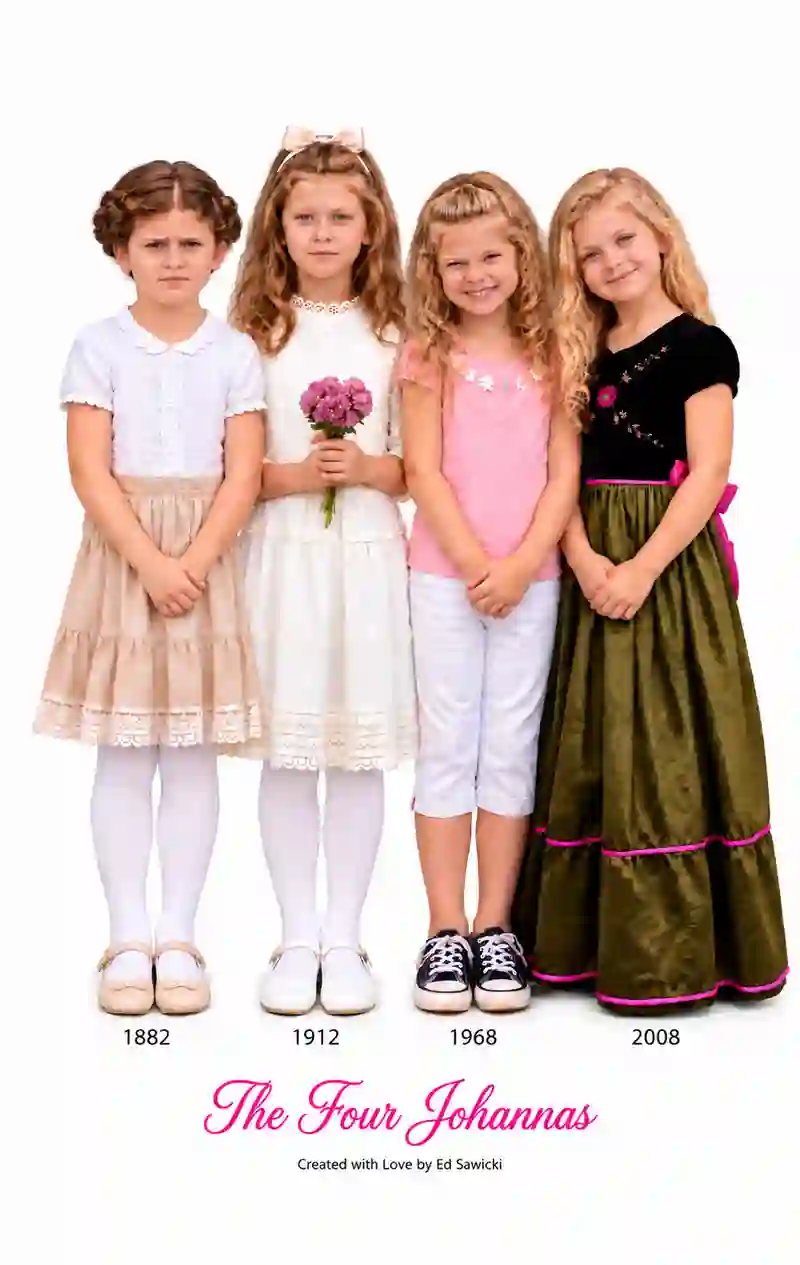
The girl on the left is what our great-grandmother looked like (according to ChatGPT) when she was 8-years-old in 1882. The next girl from the left is my cousin's grandmother when she was 5-years-old in 1912. The next girl is my cousin who was 5-years-old in 1968. Her daughter is at the right when she was a similar age.
I wanted to make large prints from the image. One might be poster-sized for a family reunion. I had to increase the size of the image but retain the resolution. So, I used the Topaz Gigapixel software on my Apple iMac to produce an image that was 5,982 X 9,462 pixels, enough for any size poster I was likely to make.
The file size was about 40 MB - too large for email. Any of the online photo processing services allow you to upload your photos to their web site. If you're having your photo printed locally, you can put it on a USB flash drive (a thumbdrive).